
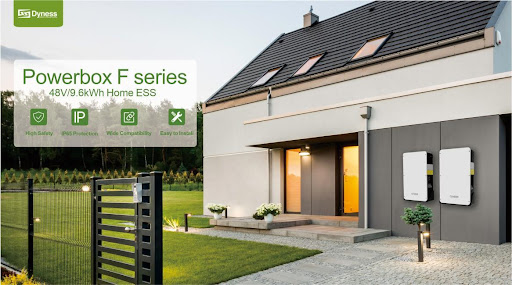
LiFePO4 batteries need to be used with special care. Lithium iron phosphate batteries have a BMS (Battery Management System), which is an electronic circuit whose main functions are to balance the charge of battery cells, limit charge and discharge current and monitor cell temperature.
In today's energy storage industry, it is not recommended that LiFePO4 batteries work with the inverter only in lead-acid mode without using BMS, that is, the operation mode without communication.
Old lead-acid batteries may apply this mode. They can be connected to the inverter, charging or discharging to the controller, without much complexity other than series or parallel connection, and they also do not require BMS electronic circuits.
But nowadays, for building mass storage systems, for off-grid systems or backup systems, it is usually necessary to connect the battery pack, that is, to make the battery pack an integral system and build the communication between battery modules within the system.
Furthermore, the system will communicate with the inverter through the “Master” battery, sending information to the inverter to make the entire system a self-managing energy storage system.
Installing high-quality battery BMS can effectively improve the utilization rate of the battery, prevent battery overcharging and over-discharging, and extend battery life.
The BMS can also monitor the operating status of the battery and each battery cell, effectively prevent spontaneous combustion and warn the driver in advance in an emergency situation.
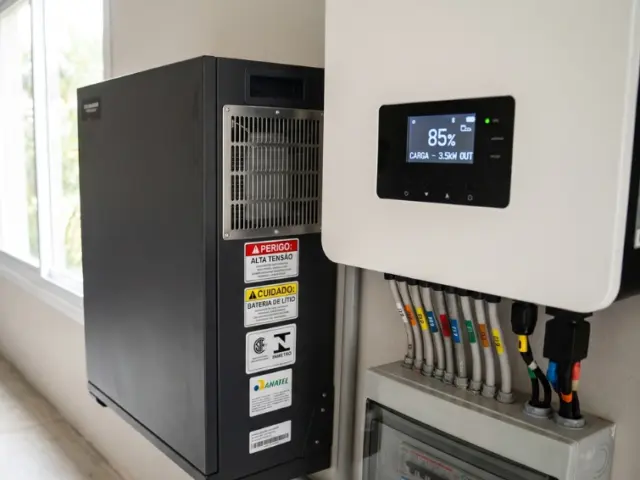
Some manufacturers offer lithium iron phosphate battery packs with integrated BMS and communication interface. These phosphate iron lithium batteries can be used in parallel, as long as some precautions are observed.
When connecting the battery pack to the inverter, it is also necessary to connect a communication cable in addition to the power cable. The operation of the set depends on the establishment of a communication channel for the exchange of data and commands between the inverter and the battery pack. To do this, it must be approved to work with specific inverters.
Due to the complexity of the operation of a set of LiFePO4 batteries, parallel expansion of the batteries also requires special attention. The manufacturer typically defines how much of a given model can be connected in parallel.
In order to perform the correct operation of the battery expansion, the sets must work in parallel. This means that there must be data communication between them. Additionally, one of the batteries is set as “Master” and the other batteries will be set as “Slave”.
As an example, we cite the connection between the Powerbox battery (Dyness) and the Growatt-SPF series inverter. The Powerbox (Dyness) battery pack is configured in parallel:
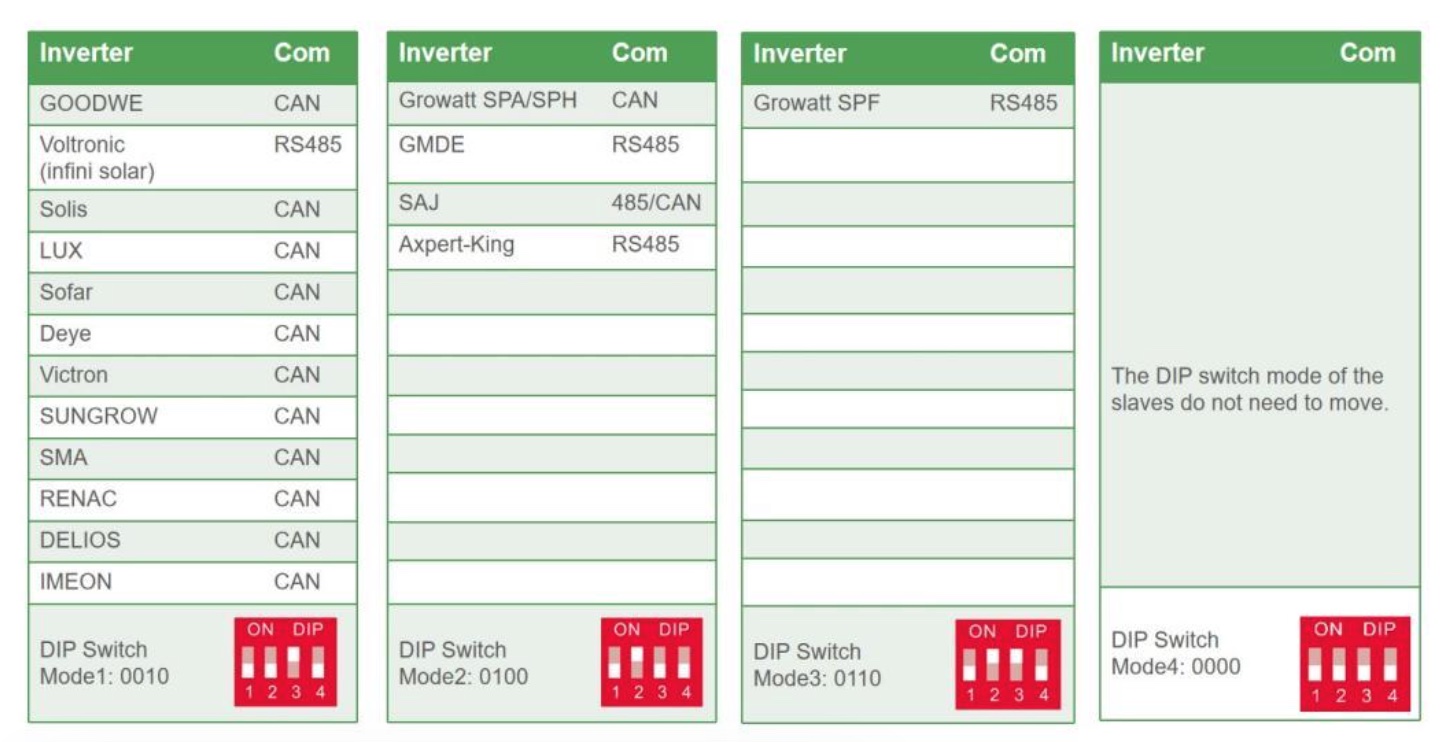
- First, confirm that the inverter type is the Growatt-SPF series, and the Powerbox is the “Master” battery. Then, the dialing code of internal module 1 needs to be set to 0110. The dialing code setting rules are shown in Figure 1:
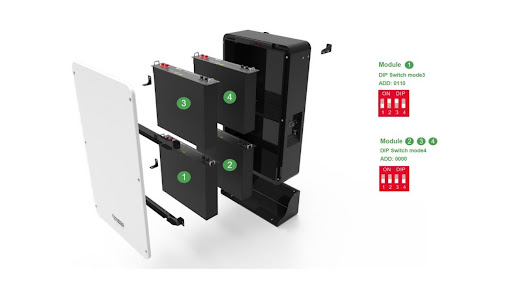
2. Then, open the top cover of the “Master” battery and set the internal module marking code 1 according to the corresponding inverter model, as shown in Figure 2:
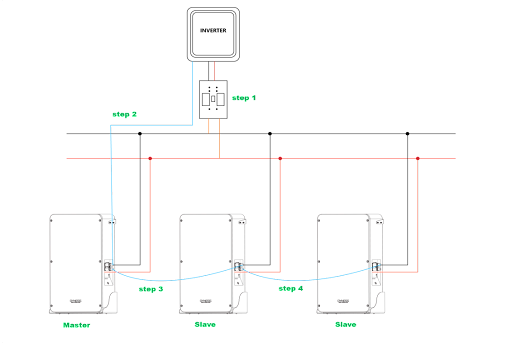
3. Then, connect three Powerbox batteries in parallel through the following steps, shown in Figure 3:
Step 1 – connect the “Master” and “Slave” battery power cables to the junction box bus.
Step 2 – connect the “Master” battery communication input to the inverter with the communication cable.
Step 3 – connect the communication output of the “Master” battery to battery #2 “Slave”. Step 4 – connect the communication output of battery #2 “Slave” to battery #3 “Slave”.
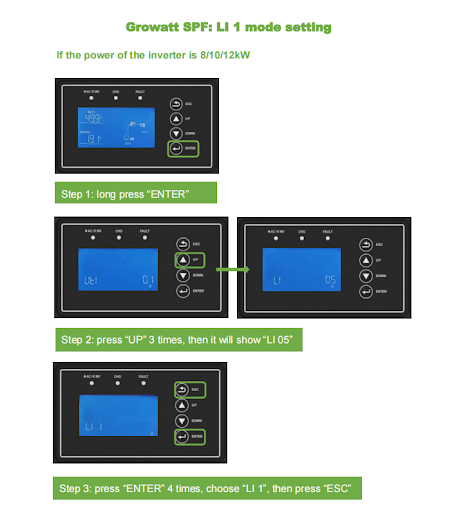
4. After completing the power and communication connection, access the Growatt-SPF series inverter configuration to define the type of battery used according to the steps shown in figures 4 and 5:


Comments
Comments are moderated before publication.Comments should be respectful and contribute to a healthy debate. Offensive comments may be removed. The opinions expressed here are those of the authors and do not necessarily reflect the views of the author. Canal Solar.